

There are two keyboard shortcuts that I recommend to other developers all the time. You don’t need to know every keyboard shortcut, and for things you rarely need the time saved compared to clicking is minimal, but these two really make a difference. I’m talking about Search Everywhere and Context Actions. That’s how they are called in IntelliJ (and other Jetbrains IDEs), but other IDEs usually have an equivalent feature, maybe under a different name.
If you’re already familiar with both of these and actually use them, you can stop reading now. However, I see developers doing things manually or with unnecessarily inefficient, error-prone workarounds so frequently that you probably don’t. Even developers who have already seen these features before often forget to use them and fall back on old habits. I know how hard it is to build new habits, so read on!
Search Everywhere
In IntelliJ (and other IDEs based on the IntelliJ platform), you simply press Shift twice. I call it “double-shift”. You can literally search everywhere: Files, classes, methods, actions. Especially that last one, actions, can be extremely helpful. You forgot in which (sub-)menu some IDE feature is, or where you can change some setting? Simply search for it. Go try it! Search for “change signature”, “format on save”, “reformat”, or “zoom”, or whatever else you can think of to get a feeling for it.
Context Actions
Context actions are things like those quick fixes you can make with the little light bulb symbol (in most IDEs):
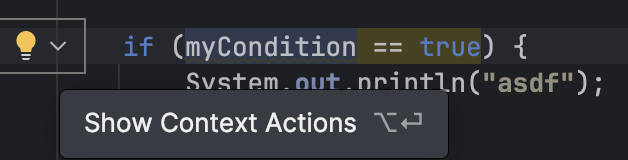
Often this is prompted by a warning or suggestion, like when there’s an obvious way to simplify a boolean expression or other small refactorings, but modern IDEs can do much more than that. It’s probably best to just try out how your IDE can make you work easier, and also safer (less prone to errors and typos). In case you need inspiration, I have a Kata on GitHub with examples of context actions to try: https://github.com/kraemer-raimund/ide-muscle-memory-kata
Habit building
How do we make sure we don’t simply forget what we’ve learned and fall back on old habits (i. e., error-prone, repetitive manual typing)? I find that the easiest way to build a new habit is to either replace one habit with another, or chain a new habit to an existing one (what James Clear calls “habit stacking”). First we need to recognize our existing, “bad” habit: For example, searching through the menus of your IDE for a specific menu entry or setting; or manually introducing a guard clause using cut-and-paste and manual typing. When you catch yourself doing the old habit, maybe it’s already too late to use the new one instead, but at least realizing it is an important first step! In some cases, it might be easy enough to undo the action and then use the new habit instead, simply to get a feeling for it and slowly build muscle memory. If it took you 30 seconds to manually change a surrounding if to a guard clause, you can easily spend another 2 seconds to try the faster, safer way.
If you want to chain the habit with an existing one, it could look like this: “Every time I finish implementing a method, I take a moment to see if I can simplify it using quick actions (simplify boolean expression, introduce guard clause, merge nested if-statements, etc.).”
Conclusion
These two keyboard shortcuts (and the IDE features themselves as well) are greatly underused by many developers. The same applies to many other IDE features, like the IDE-supported refactorings, but these two are especially useful for how little effort it takes to use them (except perhaps to build the habit). Once it becomes muscle memory, you will see how much faster and safer, with less cognitive load you will be able to do certain actions, and you will probably find yourself using both of them many times per day. When you’re using both of them routinely and without needing to consciously think about it, I recommend that you familiarize yourself with your IDEs refactoring tools next.
 Raimund Krämer