


I discovered some nice features in JUnit 5 that I haven’t really seen before in the wild, so I thought I’d share them with you.
Testing frameworks like JUnit allow for pretty expressive tests if used well. Features I’ve already been using a lot for some time now are things like parameterized tests, custom test descriptions, and some others, always depending on the circumstances. What I’ve recently discovered are nested test classes with custom display names. This allows for very neat and expressive tests when you want to group related tests together. I’ve structured tests in a similar way in C# and NUnit before, which supports nested classes out of the box without additional annotations (at least as far as I remember).
In JUnit 5 we can define nested test classes as shown in the screenshot below, using the @Nested annotation, optionally in combination with the @DisplayName annotation. I’m using it in Kotlin, but it works almost the same in Java. In Kotlin we can name tests with spaces in method names; in Java you might want to also use @DisplayName on the level of individual test methods.
import org.assertj.core.api.Assertions.assertThat
import org.junit.jupiter.api.DisplayName
import org.junit.jupiter.api.Nested
import org.junit.jupiter.api.Test

@DisplayName("Math")
internal class MathTest {

    @Nested
    @DisplayName("clamping value")
    inner class Clamp {

        @Test
        fun `within range preserves the value`() {
            val clamped = clamp(42.0f, 30.0f, 50.0f)
            assertThat(clamped).isEqualTo(42.0f)
        }

        @Test
        fun `less than min value results in min value`() {
            val clamped = clamp(13.0f, 30.0f, 50.0f)
            assertThat(clamped).isEqualTo(30.0f)
        }

        @Test
        fun `greater than max value results in max value`() {
            val clamped = clamp(1337.0f, 30.0f, 50.0f)
            assertThat(clamped).isEqualTo(50.0f)
        }
    }

    @Nested
    @DisplayName("linearly interpolating value")
    inner class Lerp {

        // omitted for brevity
    }
}
Update 01.04.2024: Replaced screenshot with code snippet.
This is what the test results look like. Using custom display names—instead of just the method names—they read very fluently, but more importantly the hierarchical grouping allows for running groups of related tests and makes it easier to interpret the test results. A double click on one of the test results still brings you directly to the respective test method, despite using the display name in the Test Results view.
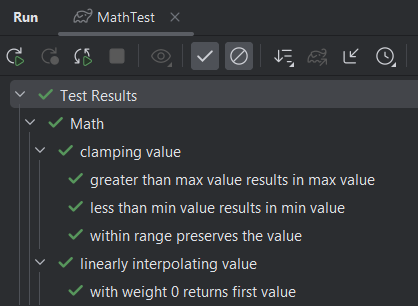
You can read more about it (including a Java example) in the official docs: https://junit.org/junit5/docs/current/user-guide/#writing-tests-nested
 Raimund Krämer