


If you use Git in the command line, when using commands like `git diff` and similar ones, it does a line-by-line diff by default. This is also what most pull request tools (GitHub etc.) do. This is perfectly fine for most situations.
Less widely known is the fact that you can also make it do a word diff, which is closer to how some IDEs like IntelliJ render diffs. To do that, you simply add the `–word-diff` option. This is great for changes like renamings etc.
Example: `git diff –word-diff`
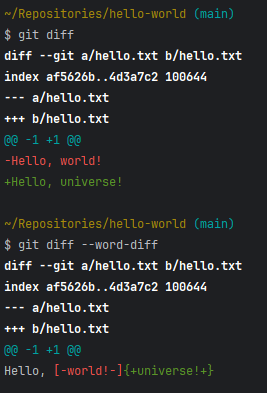
git diff without (top) and with (bottom) the ‑‑word-diff option.Note: I personally don’t use it by default, but on demand depending on the kind of code change. If you find that you use it often, you might want to consider configuring an alias like `git wdiff` or something similar.
 Raimund Krämer